Quickstart
Installation
If you have not installed Python and setup a project, follow this guide Installing Python.
To use PyOptEx, first install it using pip:
(.venv) $ pip install pyoptex
Terminology
This section summarizes some commonly used terminology and notations. You can freely skip this and come back once a term is unclear.
Y: the design matrix. When decoded, every factor is a single column. When encoded, the categorical factors are expanded to multiple dummy columns.
X: the model matrix, or X = Y2X(Y), where Y is an encoded design matrix.
Z or Zs: These are the grouping matrices for the random effects. Each Z assigns a group number to each run for a specific random effect. For example [0, 0, 1, 1] states that the first two runs are intercorrelated, and the last two are intercorrelated.
V: The V-matrix is the observation covariance matrix of Y. It is equal to \(V = \sum_{i=1}^k Z_i Z_i^T + I_N\) with k the number of random effects (Zs), and \(I_N\) the identity matrix of size N.
Vinv: The inverse of V.
M : The information matrix: \(M = X^T V^{-1} X\). The inverse, \(M^{-1}\), is the covariance matrix of the parameter estimates in X.
encoded: refers to a design matrix for which the categorical factors are dummy encoded.
decoded: refers to a design matrix for which every factor, including the categorical factors, is a single column. The categorical factors are generally numbers from 0 up to the number of levels.
normalized: refers to the design matrix being normalized between -1 and 1. A normalized design matrix is always encoded.
denormalized: refers to the design matrix with each column representing one factor, denormalized to their original levels and units. A continuous factor will be between its own min and max, a categorical factor is a column of strings representing the level name. A denormalized design matrix is always decoded.
plot or stratum: A group of runs that are correlated and are modeled with a random effect.
metric or criterion: The optimization objective for the algorithm.
continuous or quantitative: Refers to a factor having a value on a continuous, measureable scale. The values are comparable and sortable.
categorical or qualitative: Refers to a factor having a predetermined set of possible levels. The values are comparable, but not sortable.
cost function: The function which computes the resource consumption of the design matrix.
cost or resource consumption: The cost or amount of resources consumed for the design.
budget: The maximum resource consumption for the experiment.
Create your first design
Note
If you would like a refresher on optimal design of experiments, see Optimal design of experiments (DoE).
Note
The examples below are generated without parallelization. It is highly recommended to read the section Parallelization to speed up the design generation.
We will start by creating a fully randomized D-optimal design
with 20 runs, one categorical and two continuous factors,
using the coordinate-exchange algorithm. We are using the
fixed_structure submodule
for this. The complete Python script for the generation of such a design can be
found in example_randomized_fs.py.
Start by importing the necessary modules
>>> # Python imports
>>> import os
>>> import time
>>>
>>> # PyOptEx imports
>>> from pyoptex._seed import set_seed
>>> from pyoptex.utils.model import partial_rsm_names, model2Y2X
>>> from pyoptex.doe.fixed_structure import (
>>>     Factor, create_fixed_structure_design, create_parameters, default_fn
>>> )
>>> from pyoptex.doe.fixed_structure.metric import Dopt
We define the number of runs
>>> nruns = 20
Next, we define the factors for our experiment. We have one categorical factor A with levels L1, L2, and L3. We also define two continuous factors B, and C. By default, factor B is in the range [-1, 1]. However, by specifying the min and max properties, we can define C in the range [2, 5].
>>> factors = [
>>>     Factor('A', type='categorical', levels=['L1', 'L2', 'L3']),
>>>     Factor('B', type='continuous'),
>>>     Factor('C', type='continuous', min=2, max=5),
>>> ]
Note
By default, a continuous factor is discretised to three points [low, mid, high]. If a higher degree of discretization is desired, see Discrete numerical factors.
Note
The encoding of the categorical factors can also be customized using the coords parameter. See Custom categorical encoding for more information.
Then, we must define a model. We define a full response surface model with 9 parameters, including the intercept, all three main effects, three two-factor interactions, and two quadratic effects of the factors B and C. The first command creates a matrix representation of the model, the second converts this matrix representation to a callable function, which transforms a design matrix (Y) to a model matrix (X).
>>> model = partial_rsm_names({
>>>     'A': 'tfi',
>>>     'B': 'quad',
>>>     'C': 'quad',
>>> })
>>> Y2X = model2Y2X(model, factors)
Note
Any custom linear model can be used. See Custom models for more information.
Finally, we must also specify the metric which we want to optimize. In this case, we optimize for D-optimality (namely accurate parameter estimates).
>>> metric = Dopt()
Note
Metrics can also be fully customized. See Custom metrics for more information.
Finally, we are ready to generate a design using the following code snippet.
>>> # Parameter initialization
>>> n_tries = 10
>>>
>>> # Create the set of operators
>>> fn = default_fn(metric, Y2X)
>>> params = create_parameters(factors, fn, nruns)
>>>
>>> # Create design
>>> start_time = time.time()
>>> Y, state = create_fixed_structure_design(params, n_tries=n_tries)
>>> end_time = time.time()
The function create_fixed_structure_design
returns a dataframe Y containing the design, and the final internal
state of the algorithm which contains the encoded design matrix, model matrix,
and metric value.
Note
Whenever the generation takes too long, the user can cancel the generation by pressing CTRL+C once in the terminal which will cause the algorithm to halt and return the current best design.
We can write the design to a csv
>>> root = os.path.split(__file__)[0]
>>> Y.to_csv(os.path.join(root, 'example_randomized_fs.csv'), index=False)
And we can print the final metric, execution time and design to the console.
>>> print('Completed optimization')
>>> print(f'Metric: {state.metric:.3f}')
>>> print(f'Execution time: {end_time - start_time:.3f}')
>>> print(Y)
More information on how to evaluate the design in Evaluation.
Note
A split-plot design with only one stratum, the easy-to-change stratum
is also a fully randomized design. Because of the update formulas,
creating a randomized design with the
create_splitk_plot_design
may be faster.
Such an example script may be found in
example_randomized_sp.py
Creating a splitk-plot design
What if the factor A was actually a component that was hard-to-change? In such a scenario, design of experiments literature recommends the use of a split-plot design, where the factor A is no longer reset with every run. We will create a split-plot design with 5 whole plots and 4 runs per whole plot. The Python script for the generation of such a design can be found in example_splitplot_sp.py.
To create a split-plot design, first, we require the imports again.
>>> # Python imports
>>> import os
>>> import time
>>> import numpy as np
>>>
>>> # PyOptEx imports
>>> from pyoptex._seed import set_seed
>>> from pyoptex.utils.model import partial_rsm_names, model2Y2X
>>> from pyoptex.doe.fixed_structure import Factor
>>> from pyoptex.doe.fixed_structure.splitk_plot import (
>>>     create_splitk_plot_design, default_fn, create_parameters, Plot
>>> )
>>> from pyoptex.doe.fixed_structure.splitk_plot.metric import Dopt
Note that we now import most from splitk_plot
instead of fixed_structure.
Next, we define the hard-to-change and easy-to-change plots (or strata).
>>> etc = Plot(level=0, size=4)
>>> htc = Plot(level=1, size=5, ratio=0.1)
>>> plots = [etc, htc]
>>> nruns = np.prod([p.size for p in plots])
Note
Split-plot designs require the user to specify an estimate of the ratio between the variance of the random effect and the random error, here noted on line 2 by the parameter ratio. Generally, a value of 1 is a good estimate, however, a Bayesian approach is also possible. See Bayesian a-priori variances for more information.
We specify the factors with the stratum they are in.
>>> factors = [
>>>     Factor('A', htc, type='categorical', levels=['L1', 'L2', 'L3']),
>>>     Factor('B', etc, type='continuous'),
>>>     Factor('C', etc, type='continuous', min=2, max=5),
>>> ]
And like in Create your first design, we define the optimization metric as D-optimality
>>> metric = Dopt()
Finally, we generate the split-plot design.
>>> # Parameter initialization
>>> n_tries = 10
>>>
>>> # Create the set of operators
>>> fn = default_fn(metric, Y2X)
>>> params = create_parameters(factors, fn)
>>>
>>> # Create design
>>> start_time = time.time()
>>> Y, state = create_splitk_plot_design(params, n_tries=n_tries)
>>> end_time = time.time()
More information on how to evaluate the design in Evaluation.
Note
Adding more plots is as easy as specifying higher levels and assigning factors to them. For example, the very-hard-to-change factors in a split-split-plot design would have a
>>> vhtc = Plot(level=2)
Note
While a split-plot design can also be created using
create_fixed_structure_design,
using create_splitk_plot_design
is generally faster due to the update formulas.
Creating other fixed structure designs
Not every design is either randomized or a split-plot design.
For instance, a strip-plot design defines multiple non-sequential runs
to be grouped together. For any scenario where the randomization
structure does not depend on the design and the number of runs is fixed,
you can use the create_fixed_structure_design.
Let’s create a simple strip-plot design with 5 whole plots and 4 runs per whole plot. The Python script for the generation of such a design can be found in example_strip_plot_fs.py.
Like all previous examples, we start with the imports
>>> # Python imports
>>> import os
>>> import time
>>> import numpy as np
>>>
>>> # PyOptEx imports
>>> from pyoptex._seed import set_seed
>>> from pyoptex.utils.model import partial_rsm_names, model2Y2X
>>> from pyoptex.doe.fixed_structure import (
>>>     Factor, RandomEffect, create_fixed_structure_design,
>>>     create_parameters, default_fn
>>> )
>>> from pyoptex.doe.fixed_structure.metric import Dopt
Next, we define the random effect for a strip-plot design.
>>> nruns = 20
>>> nplots = 5
>>> re = RandomEffect(np.tile(np.arange(nplots), nruns//nplots), ratio=0.1)
For this example, the Z associated with the random effect will be
>>> np.tile(np.arange(nplots), nruns//nplots)
[0 1 2 3 4 0 1 2 3 4 0 1 2 3 4 0 1 2 3 4]
Next, define the factors. Note that we assign A to the first random effect.
>>> factors = [
>>>     Factor('A', re, type='categorical', levels=['L1', 'L2', 'L3']),
>>>     Factor('B', type='continuous'),
>>>     Factor('C', type='continuous', min=2, max=5),
>>> ]
Finally, we compute the design
>>> # Create a partial response surface model
>>> model = partial_rsm_names({
>>>     'A': 'tfi',
>>>     'B': 'quad',
>>>     'C': 'quad',
>>> })
>>> Y2X = model2Y2X(model, factors)
>>>
>>> # Define the metric
>>> metric = Dopt()
>>>
>>> # Parameter initialization
>>> n_tries = 10
>>>
>>> # Create the set of operators
>>> fn = default_fn(metric, Y2X)
>>> params = create_parameters(factors, fn, nruns)
>>>
>>> # Create design
>>> start_time = time.time()
>>> Y, state = create_fixed_structure_design(params, n_tries=n_tries)
>>> end_time = time.time()
You will now notice that the resulting design has the same setting of factor A for runs [1, 6, 11, 16], the first plot of the strip-plot design
Note
If you want to force certain level constraints like in a strip-plot design, but you do not want any random effect associated, simply set the ratio of the random effect to zero.
Note
Blocking factors can be added by providing them directly to
create_parameters
Creating a cost-optimal design
Why use cost-optimal designs?
Cost optimal designs shift the philosphy of creating designs. Historically, an experiment was always created by a statistician who determines whether to use a randomized design, a split-plot design, a split-split-plot design, etc. That person would then proceed to make an estimation about the number of runs that could be performed, the sizes of the plots in a splitk-plot design, etc.

Classic optimal design procedure.
All these estimations require expert knowledge in the field of design of experiments, which most often engineers do not possess. In case the experiment is very complicated, any estimation made by the statistician may not even be optimal.
Cost optimal designs avoid these issues by directly optimizing based on the underlying resource constraints. These constraints can be time (when dealing with hard-to-change factors), money, availability of certain components or ingredients in stock, etc. The algorithm proceeds to automatically determine the optimal number of runs, run order, etc. Most often, this approach yields better designs, while simulatneously making it easier, more comprehensible, and faster for engineers to create designs. They spend less time on researching the best design, and can spend more time actually executing their design and analyzing the data.

Cost optimal design procedure.
The generalized staggered-level design
The design generated by this algorithm is a generalized staggered-level design. Mathematically, the design assumes any hard-to-change factor is only reset if the factor changes its level. In constrast to split-plot designs and regular staggered-level designs which assume a reset at fixed locations in the design. The figure below depicts the difference in interpretation. Both left and right are the same design, however, the runs are grouped differently in the middle column. The split-plot design requires a reset in the second factor whenever the first resets. The generalized-staggered level design only resets when the factor level changes.

Splitk-plot interpretation. |

(Generalized) Staggered-level interpretation. |
The problem with resets at fixed locations is that when, by accident, both consecutive levels are the same, the technician may refrain from resetting the factor. For example, if this factor is a mechanical component of a product, a technician may not want to dissassemble and reassemble the product the exact same way. This leads to a mismatch between what the experimenter desired, and what was actually executed.
An example (CODEX)
Let’s create a design with one categorical factor and three continuous factors. The categorical factor A is hard-to-change and has four levels L1, L2, L3, and L4. The three continuous factors, E, F, and G, are easy-to-change. We will optimize for I-optimality with a full response surface model. The Python script for the generation of such a design can be found in example_cost_optimal_codex.py.
As we are dealing with hard-to-change factors, our limiting resource is time. We will be using 3 days of 4 hours each, for a total of 720 minutes. To reset factor A, we require 2 hours. To reset any of the factors E, F, or G, we require only a single minute (they are easy-to-vary). The execution cost of a single run is 5 minutes. Some times, multiple factors are reset simultaneously. In this case, we assume that the transition cost is determined by the most-hard-to-change factor. Such a scenario arises when multiple workers or technicians can work in parallel on their own task.
First, start with the necessary imports
>>> # Python imports
>>> import time
>>> import os
>>>
>>> # PyOptEx imports
>>> from pyoptex._seed import set_seed
>>> from pyoptex.utils.model import partial_rsm_names, model2Y2X
>>> from pyoptex.doe.cost_optimal import Factor
>>> from pyoptex.doe.cost_optimal.metric import Iopt
>>> from pyoptex.doe.cost_optimal.cost import parallel_worker_cost
>>> from pyoptex.doe.cost_optimal.codex import (
>>>     create_cost_optimal_codex_design, default_fn, create_parameters
>>> )
Then we define the factors. We define factor A as categorical, and the other three factors E, F, G are continuous and easy-to-vary by setting the group parameter to False. Easy-to-change parameters are assumed to be reset with every run, no matter the factor level. Factor F is also considered to be between [2, 5] instead of the default [-1, 1].
>>> factors = [
>>>     Factor('A', type='categorical', levels=['L1', 'L2', 'L3', 'L4']),
>>>     Factor('E', type='continuous', grouped=False),
>>>     Factor('F', type='continuous', grouped=False, min=2, max=5),
>>>     Factor('G', type='continuous', grouped=False),
>>> ]
Note
Every hard-to-change factor has a random effect associated with itself. The ratio can be specified using a ratio parameter and is set to 1 by default, which is generally a good estimate. In addition, the user can also opt for a Bayesian approach. See Bayesian a-priori variances for more information.
Next, we define the response surface model. Every continuous factor is added with their main effect, two-factor interactions, and quadratic effect. The categorical factor is only added as a main effect and two-factor interaction. Similar to Create your first design, the second command converts the matrix of the model to a callable.
>>> model = partial_rsm_names({
>>>     'A': 'tfi',
>>>     'E': 'quad',
>>>     'F': 'quad',
>>>     'G': 'quad'
>>> })
>>> Y2X = model2Y2X(model, factors)
Note
Any linear model can be used. See Custom models for more information.
We must also specify the optimization criterion. In this case, I-optimality.
>>> metric = Iopt()
Note
Any optimization metric can be used. See Custom metrics for more information.
Then, we create the cost function using the
parallel_worker_cost
helper function. This cost function defines that the cost of transition between two
consecutive runs is equal to the transition cost of the most-hard-to-change factor.
Such a scenario arises when multiple workers or technicians can work in parallel on their
own task. Factor A has a transition cost of two hours, the three easy-to-change
factors have a transition cost of one minute.
>>> max_transition_cost = 3*4*60
>>> transition_costs = {
>>>     'A': 2*60,
>>>     'E': 1,
>>>     'F': 1,
>>>     'G': 1
>>> }
>>> execution_cost = 5
>>> cost_fn = parallel_worker_cost(transition_costs, factors, max_transition_cost, execution_cost)
Note
The power of the algorithm is in the possibility to define your own cost function. For more information, see Custom cost functions.
Finally, we can generate the design
>>> # Simulation parameters
>>> nsims = 10
>>> nreps = 1
>>> fn = default_fn(nsims, cost_fn, metric, Y2X)
>>> params = create_parameters(factors, fn)
>>>
>>> # Create design
>>> start_time = time.time()
>>> Y, state = create_cost_optimal_codex_design(
>>>     params, nsims=nsims, nreps=nreps
>>> )
>>> end_time = time.time()
create_cost_optimal_codex_design
returns the design Y and the corresponding internal state
with the encoded design matrix, model matrix, metric, cost, etc.
We can write the design to a csv
>>> root = os.path.split(__file__)[0]
>>> Y.to_csv(os.path.join(root, f'example_cost_optimal_codex.csv'), index=False)
And we can print the resulting metric, cost, number of experiments and execution time to the console.
>>> print('Completed optimization')
>>> print(f'Metric: {state.metric:.3f}')
>>> print(f'Cost: {state.cost_Y}')
>>> print(f'Number of experiments: {len(state.Y)}')
>>> print(f'Execution time: {end_time - start_time:.3f}')
Evaluation
Evaluating the resulting design is just as important as correctly generating them. In order to ease the evaluation, some common functions have been pre-implemented.
First, we can do a generic evaluation. The first command imports the necessary functions, the second plots the design graphically, and the last command plots the color map on correlations for the design.
>>> from pyoptex.doe.utils.evaluate import design_heatmap, plot_correlation_map
>>> design_heatmap(Y, factors).show()
>>> plot_correlation_map(Y, factors, fn.Y2X, model=model).show()
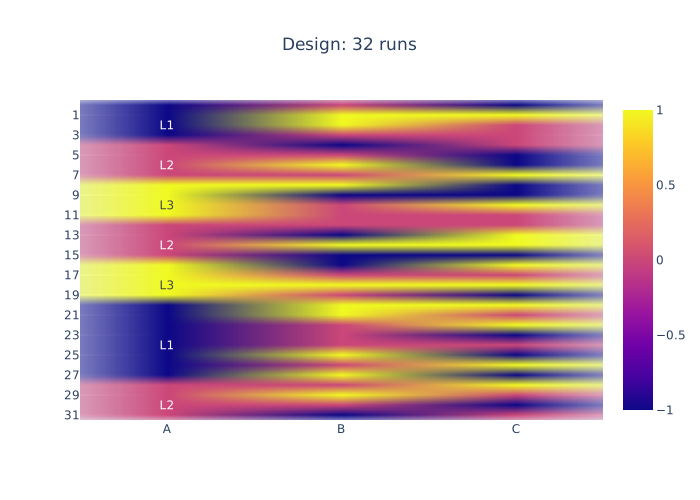
A heatmap of the design, |
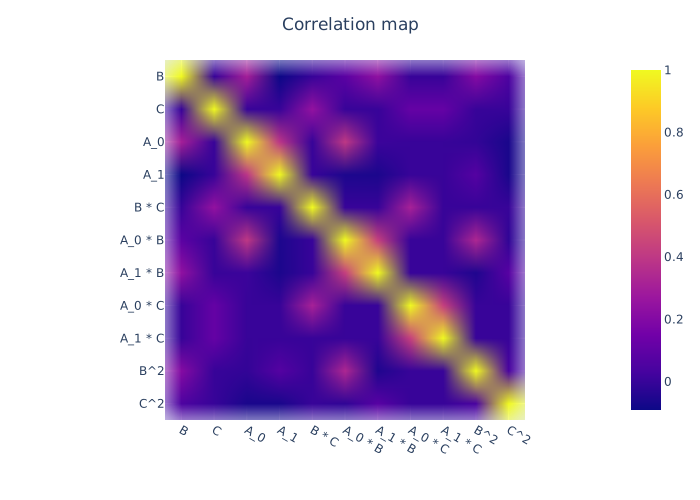
The color map on correlations |
The next evaluations depend on how the design should be interpreted. Is it a fixed structure design, or a cost-optimal design (generalized staggered-level design). Depending on the type, the imports are different.
For a fixed structure design
>>> from pyoptex.doe.fixed_structure.evaluate import (
>>>     evaluate_metrics, plot_fraction_of_design_space,
>>>     plot_estimation_variance_matrix, estimation_variance
>>> )
For a cost-optimal design (generalized staggered-level design)
>>> from pyoptex.doe.cost_optimal.evaluate import (
>>>     evaluate_metrics, plot_fraction_of_design_space,
>>>     plot_estimation_variance_matrix, estimation_variance
>>> )
Once imported, we can evaluate the design. The first command prints the metric value for the different provided metrics to the console. The second command plots a fraction of design space plot. The third command plots the covariance matrix of the parameter estimates. Finally, the last commands prints the variances of the parameter estimates to the console. The params are the simulation parameters which are passed to the design generation functions.
>>> print(evaluate_metrics(Y, params, [metric, Dopt(), Iopt(), Aopt()]))
>>> plot_fraction_of_design_space(Y, params).show()
>>> plot_estimation_variance_matrix(Y, params, model).show()
>>> print(estimation_variance(Y, params))
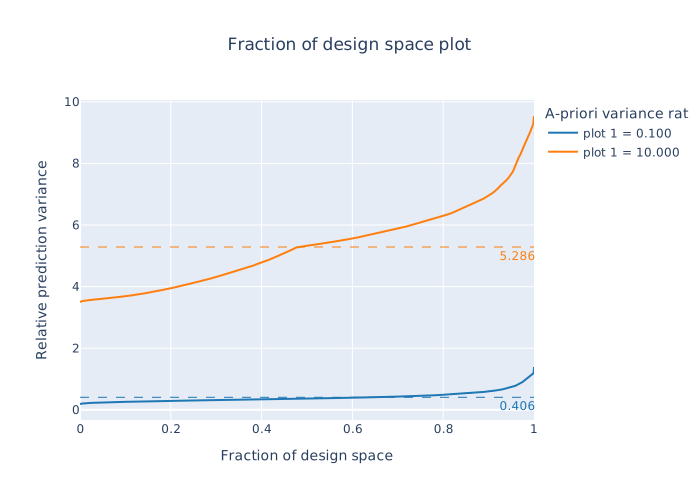
The fraction of design space plot, |
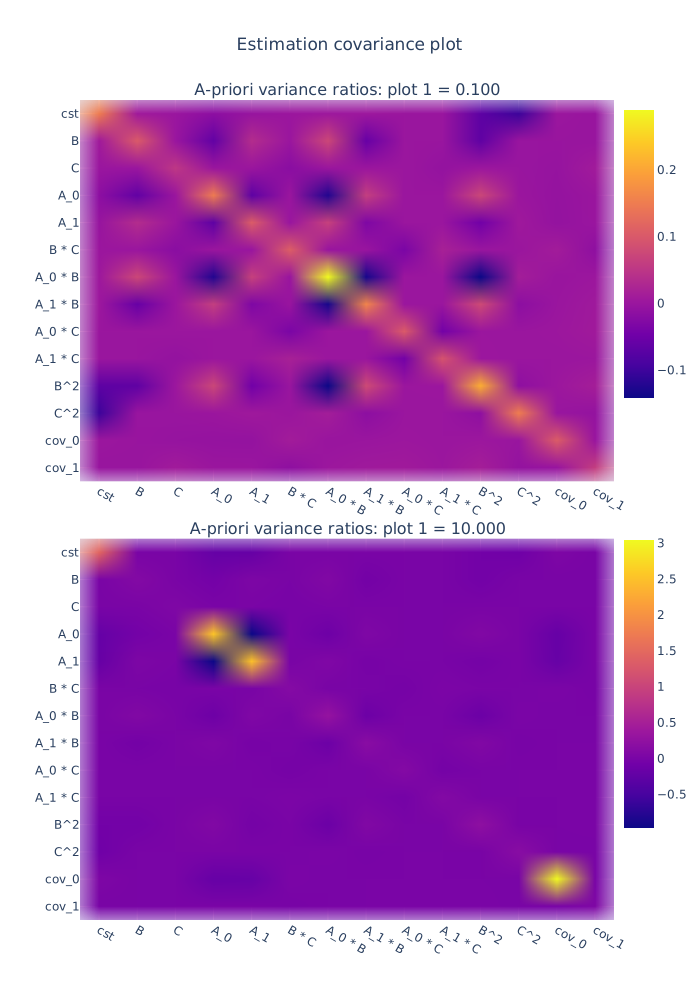
The covariance matrix of the parameter estimates. |
Parallelization
The generation of designs can easily be parallelized to speed up the generation significantly
using the parallel_generation
helper function. There are two important aspects.
The first is that when parallelizing the generation, each instance of the generation
algorithm should run on its own core to prevent cache invalidation by other instances.
Therefore, the set_nb_cores function
should be called before any import.
>>> from pyoptex.utils.runtime import set_nb_cores
>>> set_nb_cores(1)
>>>
>>> import numpy as np
>>> ...
Note
In fact, the set_nb_cores function
should be called even when not parallelizing in most cases. Due to the small size
of the matrices, the overhead of parallel linear algebra is significant and should
be avoided by forcing the algorithm to use a single core.
The second is that the generation function should be parallelized over the number of replications or iterations, depending on the generation algorithm. For example, instead of calling
>>> n_tries = 1000
>>> Y, state = create_splitk_plot_design(params, n_tries=n_tries)
you can call
>>> from pyoptex.utils.runtime import parallel_generation
>>> Y, state = parallel_generation(create_splitk_plot_design, params, n_tries=n_tries)
which will parallelize the number of iterations over the available cores. If less cores
should be used, the ncores argument can be passed to the
parallel_generation function as such
>>> Y, state = parallel_generation(create_splitk_plot_design, params, n_tries=n_tries, ncores=2)
which will parallelize the number of iterations over exactly 2 cores.
Warning
On Windows, make sure to wrap your entire code in if __name__ == '__main__': to avoid
an infinite loop of processes. Windows creates processes differently than Linux or MacOS.
An example for split-plot designs can be found at example_splitplot_multiprocessing.py and an example for cost-optimal designs can be found at example_cost_optimal_codex_mp.py